This option will load the RedAnt Updater software as shown below. Alternatively you can run the program from your desktop by selecting the RedAnt Updater Icon if available.
Please Note, the Update only needs to be run on one computer which will then update all users of RedAnt
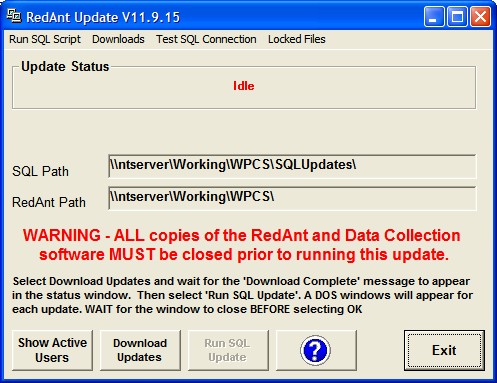
NB. You may receive a message that there are existing users logged into the system in which case you MUST NOT PROCEED until they have all logged out and closed the RedAnt software. If you are also updating the Data Collection software then please make sure all data collection software has also been closed.
The Show Active Users button will allow you to do a quick check to see if there are any users still logged in.
Select the Download Updates button and wait for the Update Status to show 'Download Complete'
The 'Run SQL Update' button will now become active. Select this to apply changes to the database files. A DOS window will appear for each update. You must not select the OK button until each windows has closed. Failure to do so will stop the process and can cause RedAnt to function incorrectly.
When all updates have been applied the Update Status will show 'Complete'. You may now exit the updater software and continue to use RedAnt as normal.
If any error messages relating to 'Unregistered Controls' appear when starting RedAnt then please refer to the following help topic for assistance. There is also a help section for troubleshooting updates here.